12.8. 浮动时钟提示符
我重写了这个提示符好几次。最初是使用八进制转义序列编写的,但其中我最需要的(保存和恢复光标位置)序列并没有被最常见的终端模拟器之一 rxvt 所识别。 我使用 tput 重写了它,这就是你在这里看到的。 要求的 tput 代码似乎被普遍识别。 提示符的主体基本上与之前显示的“轻量级”提示符相同,但时钟会保持在终端的右上角浮动。 即使调整终端大小,它也会正确地重新定位自身。
#!/bin/bash

#   Rewrite of "clock" using tput

function prompt_command {
#  prompt_x is where to position the cursor to write the clock
let prompt_x=$(tput cols)-6
#  Move up one; not sure why we need to do this, but without this, I always
#  got an extra blank line between prompts
tput cuu1
tput sc
tput cup 0 ${prompt_x}
tput setaf 4 ; tput bold
echo -n "["
tput setaf 1
echo -n "$(date +%H%M)"
tput setaf 4 ; tput bold
echo -n "]"
tput rc
}

PROMPT_COMMAND=prompt_command

function clockt {
local       BLUE="\[$(tput setaf 4 ; tput bold)\]"
local  LIGHT_RED="\[$(tput setaf 1 ; tput bold)\]"
local      WHITE="\[$(tput setaf 7 ; tput bold)\]"
local  NO_COLOUR="\[$(tput sgr0)\]"
case $TERM in
    xterm*|rxvt*)
        TITLEBAR='\[\033]0;\u@\h:\w\007\]'
        ;;
    *)
        TITLEBAR=""
        ;;
esac

PS1="${TITLEBAR}\
$BLUE[$LIGHT_RED\u@\h:\w$BLUE]\
$WHITE\$$NO_COLOUR "
PS2='> '
PS4='+ '
}
|
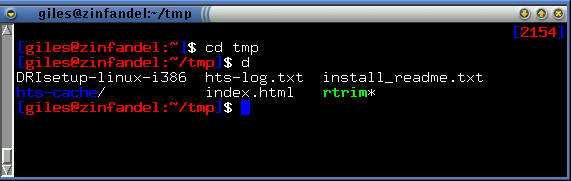
浮动时钟提示符的实际效果。 即使调整终端大小,时钟也会保持在正确的位置。